

Hello, million triangles!
There’s a rite of passage in graphics programming: Drawing your first triangle.
This typically takes thousands of lines of code. Pick any tutorial for OpenGL, Vulkan, or raw WebGPU, and you’ll spend an afternoon setting pixel formats, allocating command pools, and wiring descriptor sets & binding groups before any colored pixel reaches the screen.
We’re going to do it in 5 lines of Rust.
Step 1: Hello, triangle!
Section titled “Step 1: Hello, triangle!”To draw anything, anywhere, we need two things:
- a surface to draw on,
- and something that draws.
In FragmentColor those are a Target and a Renderer. Let’s create them:
let renderer = Renderer::new();let target = renderer.create_target(canvas).await?;const renderer = new Renderer();const target = await renderer.createTarget(canvas);renderer = Renderer()target = renderer.create_target(canvas)let renderer = Renderer()let target = try renderer.createTarget(canvas)val renderer = Renderer()val target = renderer.createTarget(canvas)The canvas is whatever your platform draws into: a <canvas> element on the web, an Arc<Window> from winit in Rust, a RenderCanvas in Python, a CAMetalLayer on iOS and a Surface on Android. In every case, the Renderer wraps it in a Target.
Now, what do we draw? A Shader: a small program that runs on the GPU, the graphics chip in your computer or phone. Drawing takes two stages. The vertex stage runs once per corner of a shape and decides where that corner lands on the screen. Every pixel inside the shape then gets one run of the fragment stage, which picks its color. FragmentColor takes its name from that second stage.
We write shaders in WGSL, the shading language of WebGPU. Here’s ours:
struct VOut { @builtin(position) pos: vec4<f32> };
@group(0) @binding(0) var<uniform> color: vec4<f32>;
@vertexfn vs_main(@builtin(vertex_index) i: u32) -> VOut {    // Three corners of an equilateral triangle, centered on the origin.    var corners = array<vec2<f32>, 3>(        vec2<f32>(-0.7, -0.404),        vec2<f32>( 0.7, -0.404),        vec2<f32>( 0.0,  0.808),    );    var out: VOut;    out.pos = vec4<f32>(corners[i], 0.0, 1.0);    return out;}
@fragmentfn fs_main() -> @location(0) vec4<f32> {    return color;}
Keep that source in a string called TRIANGLE. Three more lines turn it into a picture:
let shader = Shader::new(TRIANGLE)?;shader.set("color", __CLR_RUST__)?;renderer.render(&shader, &target)?;const shader = new Shader(TRIANGLE);shader.set("color", __CLR_JS__);renderer.render(shader, target);shader = Shader(TRIANGLE)shader.set("color", __CLR_PY__)renderer.render(shader, target)let shader = try Shader(triangle)try shader.set("color", __CLR_SWIFT__)try renderer.render(shader, target)val shader = Shader(TRIANGLE)shader.set("color", __CLR_KT__)renderer.render(shader, target)Congratulations! That’s your first triangle! Click the four numbers in the code to pick another color.
Behind those five lines of Rust, FragmentColor validates the WGSL and compiles it for your GPU. It builds a render pipeline, creates a buffer for color and copies your four numbers into it. Then it records the draw and submits it.
The shader, from the top:
var<uniform> color: vec4<f32>declares a uniform, a value the program sets from outside the shader. Its type,vec4<f32>, is four 32-bit floats, here red, green, blue and alpha. FragmentColor reads the declaration from the source and finds the uniform by its name, which is howset("color", ...)knows where the numbers go. The@group(0) @binding(0)in front is WGSL bookkeeping: no two bindings in one shader may share the same pair of numbers.vs_mainis the vertex stage. A shader with no geometry attached draws three vertices, sovs_mainruns three times. Its argumenti, marked@builtin(vertex_index), tells each run which corner to compute. The corners are in normalized device coordinates:xgoes from -1 on the left edge to 1 on the right,yfrom -1 at the bottom to 1 at the top, whatever the target’s size in pixels.VOutcarries the result inpos, the field marked@builtin(position). Afterxandycome a depth for sorting overlapping shapes and a divisor for perspective. A flat drawing leaves them at0.0and1.0.fs_main, the fragment stage, returnscolorfor every pixel the triangle covers.@location(0)on its result sends that color to the target.
vs_main returns, in normalized device coordinates. The square stretches to fill the target.Our triangle covers about a fifth of the canvas, some 440,000 pixels at 1920 × 1080. The GPU works through thousands of them at once.
Make it move
Section titled “Make it move”One call to render draws one frame. To animate, we update the uniform and render again, over and over. Each step of this tutorial splits its code into two functions. setup runs once and builds the shader. On every display refresh, frame receives time, the seconds since the animation started, and draws.
fn frame( shader: &Shader, renderer: &Renderer, target: &impl Target, time: f32,) -> Result<(), FragmentColorError> { let red = 0.5 + 0.45 * (time * 0.7).sin(); let green = 0.5 + 0.45 * (time * 0.5 + 1.7).cos(); let blue = 0.5 + 0.45 * (time * 0.9 + 3.1).sin(); shader.set("color", [red, green, blue, 1.0])?; renderer.render(shader, target)?; Ok(())}export function frame(shader, renderer, target, time) { const red = 0.5 + 0.45 * Math.sin(time * 0.7); const green = 0.5 + 0.45 * Math.cos(time * 0.5 + 1.7); const blue = 0.5 + 0.45 * Math.sin(time * 0.9 + 3.1); shader.set("color", [red, green, blue, 1.0]); renderer.render(shader, target);}def frame(shader, renderer, target, time): red = 0.5 + 0.45 * sin(time * 0.7) green = 0.5 + 0.45 * cos(time * 0.5 + 1.7) blue = 0.5 + 0.45 * sin(time * 0.9 + 3.1) shader.set("color", [red, green, blue, 1.0]) renderer.render(shader, target)func frame(_ shader: Shader, _ renderer: Renderer, _ target: WindowTarget, _ time: Float) throws { let red = 0.5 + 0.45 * sin(time * 0.7) let green = 0.5 + 0.45 * cos(time * 0.5 + 1.7) let blue = 0.5 + 0.45 * sin(time * 0.9 + 3.1) try shader.set("color", [red, green, blue, 1.0]) try renderer.render(shader, target)}fun frame(shader: Shader, renderer: Renderer, target: WindowTarget, time: Float) { val red = 0.5f + 0.45f * sin(time * 0.7f) val green = 0.5f + 0.45f * cos(time * 0.5f + 1.7f) val blue = 0.5f + 0.45f * sin(time * 0.9f + 3.1f) shader.set("color", listOf(red, green, blue, 1.0f)) renderer.render(shader, target)}Three sine waves at different speeds push red, green and blue up and down. Press play:
Step 2: A second uniform
Section titled “Step 2: A second uniform”Our corners describe a triangle with three equal sides. On a wide screen, the demo above draws it short and broad.
Normalized device coordinates run from -1 to 1 across the full width and, separately, across the full height. When the canvas is wider than it is tall, one unit along x spans more pixels than one unit along y. A phone held upright flips that: its canvas is taller than it is wide, which pulls the triangle into a thin spike.
The shader needs the canvas size to undo that stretch. A second uniform carries it:
struct VOut { @builtin(position) pos: vec4<f32> };
@group(0) @binding(0) var<uniform> color: vec4<f32>;@group(0) @binding(1) var<uniform> resolution: vec2<f32>;
@vertexfn vs_main(@builtin(vertex_index) i: u32) -> VOut {    var corners = array<vec2<f32>, 3>(        vec2<f32>(-0.7, -0.404),        vec2<f32>( 0.7, -0.404),        vec2<f32>( 0.0,  0.808),    );    // Shrink the longer axis so one unit spans as many pixels on x as on y.    let aspect = resolution.x / resolution.y;    var pos = corners[i];    if (aspect > 1.0) { pos.x = pos.x / aspect; }    else              { pos.y = pos.y * aspect; }
    var out: VOut;    out.pos = vec4<f32>(pos, 0.0, 1.0);    return out;}
@fragmentfn fs_main() -> @location(0) vec4<f32> {    return color;}
resolution holds the target’s width and height in pixels. The vertex stage divides one by the other to get the aspect ratio, then scales positions down along the longer axis to match the shorter one. One unit now covers the same number of pixels in both directions.
On the program side, frame reads the target’s size and sets it next to the color:
fn frame(    shader: &Shader,    renderer: &Renderer,    target: &impl Target,    time: f32,) -> Result<(), FragmentColorError> {    let red = 0.5 + 0.45 * (time * 0.7).sin();    let green = 0.5 + 0.45 * (time * 0.5 + 1.7).cos();    let blue = 0.5 + 0.45 * (time * 0.9 + 3.1).sin();    shader.set("color", [red, green, blue, 1.0])?;
    let size = target.size();    shader.set("resolution", [size.width as f32, size.height as f32])?;    renderer.render(shader, target)?;    Ok(())}
export function frame(shader, renderer, target, time) { const red = 0.5 + 0.45 * Math.sin(time * 0.7); const green = 0.5 + 0.45 * Math.cos(time * 0.5 + 1.7); const blue = 0.5 + 0.45 * Math.sin(time * 0.9 + 3.1); shader.set("color", [red, green, blue, 1.0]);
const size = target.size(); shader.set("resolution", [size.width, size.height]); renderer.render(shader, target);}def frame(shader, renderer, target, time): red = 0.5 + 0.45 * sin(time * 0.7) green = 0.5 + 0.45 * cos(time * 0.5 + 1.7) blue = 0.5 + 0.45 * sin(time * 0.9 + 3.1) shader.set("color", [red, green, blue, 1.0])
size = target.size() shader.set("resolution", [size.width, size.height]) renderer.render(shader, target)func frame(_ shader: Shader, _ renderer: Renderer, _ target: WindowTarget, _ time: Float) throws { let red = 0.5 + 0.45 * sin(time * 0.7) let green = 0.5 + 0.45 * cos(time * 0.5 + 1.7) let blue = 0.5 + 0.45 * sin(time * 0.9 + 3.1) try shader.set("color", [red, green, blue, 1.0])
let size = target.size() try shader.set("resolution", [Float(size.width), Float(size.height)]) try renderer.render(shader, target)}fun frame(shader: Shader, renderer: Renderer, target: WindowTarget, time: Float) { val red = 0.5f + 0.45f * sin(time * 0.7f) val green = 0.5f + 0.45f * cos(time * 0.5f + 1.7f) val blue = 0.5f + 0.45f * sin(time * 0.9f + 3.1f) shader.set("color", listOf(red, green, blue, 1.0f))
val size = target.size() shader.set("resolution", listOf(size.width.toFloat(), size.height.toFloat())) renderer.render(shader, target)}Three equal sides, on any canvas. From here on, every shader that draws our triangle declares resolution. Each frame sets it before rendering.
Step 3: The shader library
Section titled “Step 3: The shader library”The Shader constructor also takes a list. Each entry can be WGSL source, a path to a .wgsl file or the name of a function in FragmentColor’s shader library. FragmentColor joins the entries in order and compiles them as one program.
More than 200 small WGSL functions make up the library: easing curves, color spaces, hashes, noise, distance functions in 2D and 3D, lighting models and post-processing effects. Each name pairs a category with a function, such as noise/simplex2. Rust, Python, Swift and Kotlin ship the whole library inside the package and look names up offline. On the web, a name means a download, and a constructor can’t wait for one: JavaScript loads such a list with await Shader.fetch(...), while a list of plain WGSL still works with new Shader(...).
Here noise/simplex2 goes first in the list, ahead of our triangle’s source:
fn setup() -> Result<Shader, FragmentColorError> { let shader = Shader::new(["noise/simplex2", TRIANGLE])?; shader.set("color", [0.95, 0.30, 0.42, 1.0])?; Ok(shader)}export async function setup() { const shader = await Shader.fetch(["noise/simplex2", TRIANGLE]); shader.set("color", [0.95, 0.30, 0.42, 1.0]); return shader;}def setup(): shader = Shader(["noise/simplex2", TRIANGLE]) shader.set("color", [0.95, 0.30, 0.42, 1.0]) return shaderfunc setup() throws -> Shader { let shader = try Shader(["noise/simplex2", triangle]) try shader.set("color", [0.95, 0.30, 0.42, 1.0]) return shader}fun setup(): Shader { val shader = Shader(listOf("noise/simplex2", TRIANGLE)) shader.set("color", listOf(0.95f, 0.30f, 0.42f, 1.0f)) return shader}Our fragment stage can now call simplex2 as if we had written it ourselves. Three other things are new in this shader:
- A third uniform,
time.framesets it on every refresh, along withcolor. uv, a second field inVOut. For each corner, the vertex stage computes a pair of numbers between 0 and 1, a common way to label points on a surface. The GPU blends the three pairs across the triangle, giving each run offs_mainits own mix. The@locationnumbers name the slots that pass values from the vertex stage to the fragment stage. Each@locationfield ofVOuttakes a different number..rgband.a, which pick channels out of a vector:color.rgbis the first three numbers ofcolor, andcolor.ais the fourth.
struct VOut {    @builtin(position) pos: vec4<f32>,    @location(0) uv: vec2<f32>,};
@group(0) @binding(0) var<uniform> color: vec4<f32>;@group(0) @binding(1) var<uniform> resolution: vec2<f32>;@group(0) @binding(2) var<uniform> time: f32;
@vertexfn vs_main(@builtin(vertex_index) i: u32) -> VOut {    var corners = array<vec2<f32>, 3>(        vec2<f32>(-0.7, -0.404),        vec2<f32>( 0.7, -0.404),        vec2<f32>( 0.0,  0.808),    );    let aspect = resolution.x / resolution.y;    var pos = corners[i];    if (aspect > 1.0) { pos.x = pos.x / aspect; }    else              { pos.y = pos.y * aspect; }
    var out: VOut;    out.pos = vec4<f32>(pos, 0.0, 1.0);    // The corner before the aspect fix, moved from -1..1 into 0..1.    out.uv = (corners[i] + vec2<f32>(1.0)) * 0.5;    return out;}
@fragmentfn fs_main(in: VOut) -> @location(0) vec4<f32> { // simplex2 comes from noise/simplex2 and returns roughly -1..1. let noise = simplex2(in.uv * 6.0 + vec2<f32>(time * 0.4)); let brightness = 0.55 + 0.45 * (noise * 0.5 + 0.5); return vec4<f32>(color.rgb * brightness, color.a);}fn frame( shader: &Shader, renderer: &Renderer, target: &impl Target, time: f32,) -> Result<(), FragmentColorError> { let red = 0.5 + 0.45 * (time * 0.7).sin(); let green = 0.5 + 0.45 * (time * 0.5 + 1.7).cos(); let blue = 0.5 + 0.45 * (time * 0.9 + 3.1).sin(); shader.set("color", [red, green, blue, 1.0])?; shader.set("time", time)?;
let size = target.size(); shader.set("resolution", [size.width as f32, size.height as f32])?; renderer.render(shader, target)?; Ok(())}export function frame(shader, renderer, target, time) { const red = 0.5 + 0.45 * Math.sin(time * 0.7); const green = 0.5 + 0.45 * Math.cos(time * 0.5 + 1.7); const blue = 0.5 + 0.45 * Math.sin(time * 0.9 + 3.1); shader.set("color", [red, green, blue, 1.0]); shader.set("time", time);
const size = target.size(); shader.set("resolution", [size.width, size.height]); renderer.render(shader, target);}def frame(shader, renderer, target, time): red = 0.5 + 0.45 * sin(time * 0.7) green = 0.5 + 0.45 * cos(time * 0.5 + 1.7) blue = 0.5 + 0.45 * sin(time * 0.9 + 3.1) shader.set("color", [red, green, blue, 1.0]) shader.set("time", time)
size = target.size() shader.set("resolution", [size.width, size.height]) renderer.render(shader, target)func frame(_ shader: Shader, _ renderer: Renderer, _ target: WindowTarget, _ time: Float) throws { let red = 0.5 + 0.45 * sin(time * 0.7) let green = 0.5 + 0.45 * cos(time * 0.5 + 1.7) let blue = 0.5 + 0.45 * sin(time * 0.9 + 3.1) try shader.set("color", [red, green, blue, 1.0]) try shader.set("time", time)
let size = target.size() try shader.set("resolution", [Float(size.width), Float(size.height)]) try renderer.render(shader, target)}fun frame(shader: Shader, renderer: Renderer, target: WindowTarget, time: Float) { val red = 0.5f + 0.45f * sin(time * 0.7f) val green = 0.5f + 0.45f * cos(time * 0.5f + 1.7f) val blue = 0.5f + 0.45f * sin(time * 0.9f + 3.1f) shader.set("color", listOf(red, green, blue, 1.0f)) shader.set("time", time)
val size = target.size() shader.set("resolution", listOf(size.width.toFloat(), size.height.toFloat())) renderer.render(shader, target)}Simplex noise gives a smooth, random-looking value for every point in the plane. The fragment stage samples it at each pixel’s uv and slides that point as time grows. Each value scales the color between 55% and full brightness. Soft patches of light drift across the triangle like sunlight through leaves on a windy day.
Step 4: Bring your own vertices
Section titled “Step 4: Bring your own vertices”So far the corners have lived inside the shader. Most programs keep their geometry on the CPU and send it to the GPU. FragmentColor gives them two objects for that:
Vertexis one point. Its constructor takes the position, andsetattaches any other attribute by name, such as a color, a normal or texture coordinates.Meshis a list of vertices.
We build three vertices, each with its own color, and attach the mesh to the shader:
fn setup() -> Result<Shader, FragmentColorError> {    let shader = Shader::new(GRADIENT)?;
    let mesh = Mesh::new();    mesh.add_vertices([        Vertex::new([-0.7, -0.404, 0.0]).set("color", [0.95, 0.30, 0.42]),        Vertex::new([0.7, -0.404, 0.0]).set("color", [0.30, 0.85, 0.55]),        Vertex::new([0.0, 0.808, 0.0]).set("color", [0.30, 0.55, 0.95]),    ]);    shader.add_mesh(&mesh)?;    Ok(shader)}
export function setup() { const shader = new Shader(GRADIENT);
const mesh = new Mesh(); mesh.addVertices([ new Vertex([-0.7, -0.404, 0.0]).set("color", [0.95, 0.30, 0.42]), new Vertex([0.7, -0.404, 0.0]).set("color", [0.30, 0.85, 0.55]), new Vertex([0.0, 0.808, 0.0]).set("color", [0.30, 0.55, 0.95]), ]); shader.addMesh(mesh); return shader;}def setup(): shader = Shader(GRADIENT)
mesh = Mesh() mesh.add_vertices([ Vertex([-0.7, -0.404, 0.0]).set("color", [0.95, 0.30, 0.42]), Vertex([0.7, -0.404, 0.0]).set("color", [0.30, 0.85, 0.55]), Vertex([0.0, 0.808, 0.0]).set("color", [0.30, 0.55, 0.95]), ]) shader.add_mesh(mesh) return shaderfunc setup() throws -> Shader { let shader = try Shader(gradient)
let mesh = Mesh() mesh.addVertices([ try Vertex([-0.7, -0.404, 0.0]).set("color", [0.95, 0.30, 0.42]), try Vertex([0.7, -0.404, 0.0]).set("color", [0.30, 0.85, 0.55]), try Vertex([0.0, 0.808, 0.0]).set("color", [0.30, 0.55, 0.95]), ]) try shader.addMesh(mesh) return shader}fun setup(): Shader { val shader = Shader(GRADIENT)
val mesh = Mesh() mesh.addVertices(listOf( Vertex(listOf(-0.7f, -0.404f, 0.0f)).set("color", listOf(0.95f, 0.30f, 0.42f)), Vertex(listOf(0.7f, -0.404f, 0.0f)).set("color", listOf(0.30f, 0.85f, 0.55f)), Vertex(listOf(0.0f, 0.808f, 0.0f)).set("color", listOf(0.30f, 0.55f, 0.95f)), )) shader.addMesh(mesh) return shader}Each position has a third number, z, for depth. Our flat triangle sets it to 0.0.
The vertex stage now declares two inputs, position at @location(0) and color at @location(1). On a vertex input, @location refers to an attribute slot. Attribute slots have a numbering of their own, apart from the one in VOut. When we call add_mesh, FragmentColor matches the vertices’ positions and color attributes to those inputs by name. If the mesh has nothing for an input the shader reads, the call fails with an error that names it.
struct VOut {    @builtin(position) pos: vec4<f32>,    @location(0) color: vec3<f32>,};
@group(0) @binding(0) var<uniform> resolution: vec2<f32>;
@vertexfn vs_main(    @location(0) position: vec3<f32>,    @location(1) color: vec3<f32>,) -> VOut {    let aspect = resolution.x / resolution.y;    var pos = position.xy;    if (aspect > 1.0) { pos.x = pos.x / aspect; }    else              { pos.y = pos.y * aspect; }
    var out: VOut;    out.pos = vec4<f32>(pos, 0.0, 1.0);    out.color = color;    return out;}
@fragmentfn fs_main(in: VOut) -> @location(0) vec4<f32> {    return vec4<f32>(in.color, 1.0);}
position.xy keeps the first two numbers of position and drops z.
Pink, green and blue sit at the three corners. The GPU blends the vertex colors as it blends uv in step 3: a pixel near the pink corner comes out mostly pink, while one in the middle gets equal parts of all three. Our program only ever sets the corners.
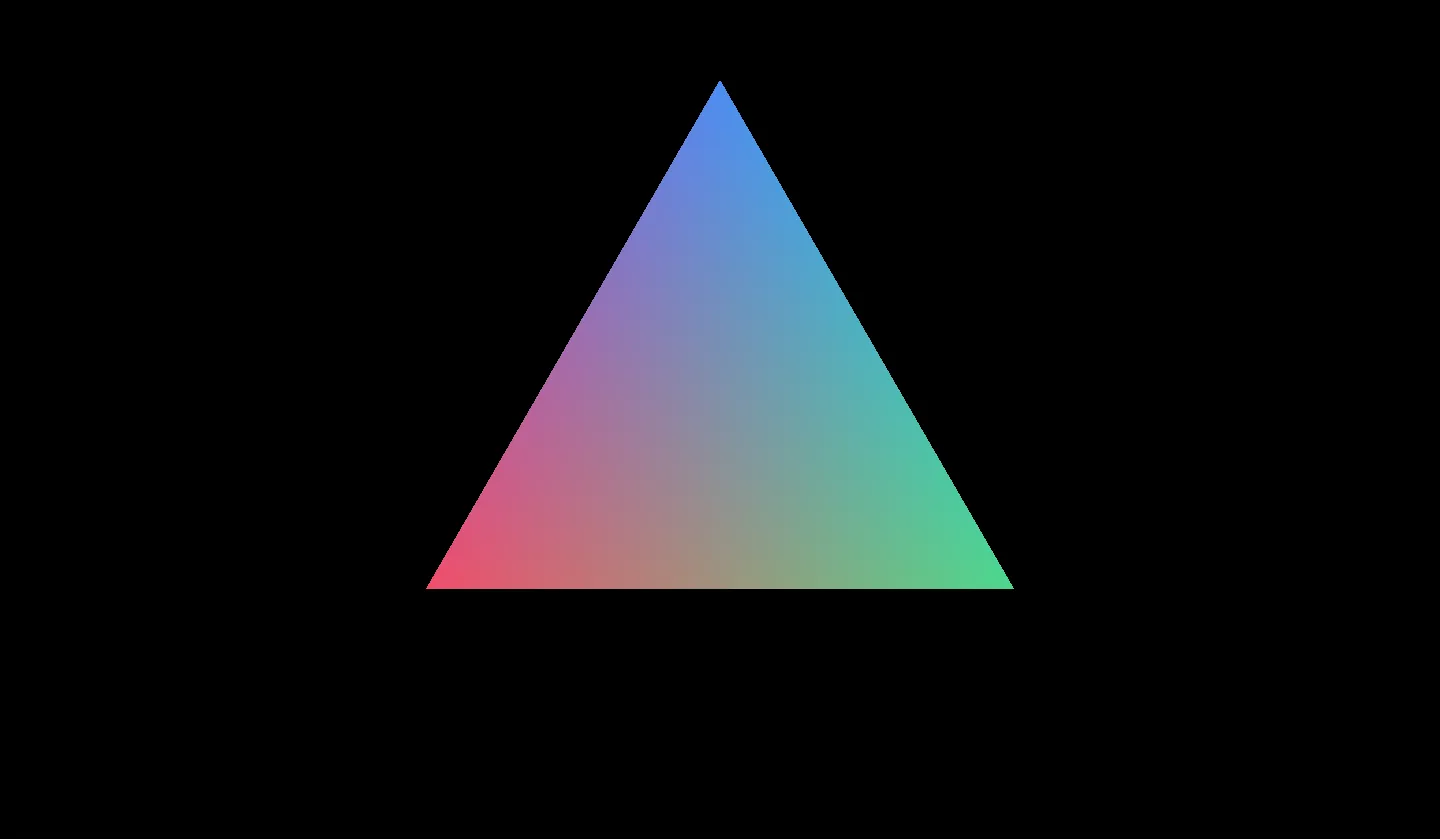
fs_main receives. The middle pixel gets a third of each corner's color.Step 5: Fifteen thousand triangles
Section titled “Step 5: Fifteen thousand triangles”One triangle is a warm-up. Let’s draw 15,000.
The mesh from step 4 is all we need: the GPU repeats it 15,000 times, each copy with its own spot, phase and tint. Those copies are instances. An Instance holds the attributes of one copy, as a Vertex holds the attributes of one corner. Graphics programmers call small things drawn in large numbers particles. So does our code.
fn setup() -> Result<Shader, FragmentColorError> {    let shader = Shader::new(["easing/in_out_sine", PARTICLES])?;
    let mesh = Mesh::new();    mesh.add_vertices([        Vertex::new([-0.7, -0.404, 0.0]).set("color", [0.95, 0.30, 0.42]),        Vertex::new([0.7, -0.404, 0.0]).set("color", [0.30, 0.85, 0.55]),        Vertex::new([0.0, 0.808, 0.0]).set("color", [0.30, 0.55, 0.95]),    ]);
    for _ in 0..COPIES {        let center = [fastrand::f32() * 2.0 - 1.0, fastrand::f32() * 2.0 - 1.0];        let phase = fastrand::f32() * TAU;        let tint = [            0.2 + fastrand::f32() * 0.8,            0.2 + fastrand::f32() * 0.8,            0.2 + fastrand::f32() * 0.8,        ];        mesh.add_instance(            Instance::new()                .set("center", center)                .set("phase", phase)                .set("tint", tint),        );    }
    shader.add_mesh(&mesh)?;    Ok(shader)}
export async function setup() { const shader = await Shader.fetch(["easing/in_out_sine", PARTICLES]);
const mesh = new Mesh(); mesh.addVertices([ new Vertex([-0.7, -0.404, 0.0]).set("color", [0.95, 0.30, 0.42]), new Vertex([0.7, -0.404, 0.0]).set("color", [0.30, 0.85, 0.55]), new Vertex([0.0, 0.808, 0.0]).set("color", [0.30, 0.55, 0.95]), ]);
for (let copy = 0; copy < COPIES; copy++) { const center = [Math.random() * 2 - 1, Math.random() * 2 - 1]; const phase = Math.random() * 2 * Math.PI; const tint = [ 0.2 + Math.random() * 0.8, 0.2 + Math.random() * 0.8, 0.2 + Math.random() * 0.8, ]; mesh.addInstance( new Instance() .set("center", center) .set("phase", phase) .set("tint", tint), ); }
shader.addMesh(mesh); return shader;}def setup(): shader = Shader(["easing/in_out_sine", PARTICLES])
mesh = Mesh() mesh.add_vertices([ Vertex([-0.7, -0.404, 0.0]).set("color", [0.95, 0.30, 0.42]), Vertex([0.7, -0.404, 0.0]).set("color", [0.30, 0.85, 0.55]), Vertex([0.0, 0.808, 0.0]).set("color", [0.30, 0.55, 0.95]), ])
for _ in range(COPIES): center = [uniform(-1.0, 1.0), uniform(-1.0, 1.0)] phase = uniform(0.0, tau) tint = [uniform(0.2, 1.0), uniform(0.2, 1.0), uniform(0.2, 1.0)] mesh.add_instance( Instance() .set("center", center) .set("phase", phase) .set("tint", tint) )
shader.add_mesh(mesh) return shaderfunc setup() throws -> Shader { let shader = try Shader(["easing/in_out_sine", particles])
let mesh = Mesh() mesh.addVertices([ try Vertex([-0.7, -0.404, 0.0]).set("color", [0.95, 0.30, 0.42]), try Vertex([0.7, -0.404, 0.0]).set("color", [0.30, 0.85, 0.55]), try Vertex([0.0, 0.808, 0.0]).set("color", [0.30, 0.55, 0.95]), ])
for _ in 0..<copies { let center = [Float.random(in: -1...1), Float.random(in: -1...1)] let phase = Float.random(in: 0..<(2 * .pi)) let tint = (0..<3).map { _ in Float.random(in: 0.2...1.0) } try mesh.addInstance( Instance() .set("center", center) .set("phase", phase) .set("tint", tint) ) }
try shader.addMesh(mesh) return shader}fun setup(): Shader { val shader = Shader(listOf("easing/in_out_sine", PARTICLES))
val mesh = Mesh() mesh.addVertices(listOf( Vertex(listOf(-0.7f, -0.404f, 0.0f)).set("color", listOf(0.95f, 0.30f, 0.42f)), Vertex(listOf(0.7f, -0.404f, 0.0f)).set("color", listOf(0.30f, 0.85f, 0.55f)), Vertex(listOf(0.0f, 0.808f, 0.0f)).set("color", listOf(0.30f, 0.55f, 0.95f)), ))
repeat(COPIES) { val center = listOf(Random.nextFloat() * 2f - 1f, Random.nextFloat() * 2f - 1f) val phase = Random.nextFloat() * 2f * PI.toFloat() val tint = List(3) { 0.2f + Random.nextFloat() * 0.8f } mesh.addInstance( Instance() .set("center", center) .set("phase", phase) .set("tint", tint) ) }
shader.addMesh(mesh) return shader}position and color change from corner to corner. center, phase and tint belong to an Instance: all three corners of a copy use the same ones.
struct VOut {    @builtin(position) pos: vec4<f32>,    @location(0) color: vec3<f32>,};
@group(0) @binding(0) var<uniform> resolution: vec2<f32>;@group(0) @binding(1) var<uniform> time: f32;
@vertexfn vs_main(    @location(0) position: vec3<f32>, // per vertex    @location(1) color: vec3<f32>,    // per vertex    @location(2) center: vec2<f32>,   // per instance    @location(3) phase: f32,          // per instance    @location(4) tint: vec3<f32>,     // per instance) -> VOut {    // Shrink the triangle and keep its shape, as in step 2.    let aspect = resolution.x / resolution.y;    var shape = position.xy * 0.03;    if (aspect > 1.0) { shape.x = shape.x / aspect; }    else              { shape.y = shape.y * aspect; }
    // Each copy loops around its center, offset by its own phase.    let wobble = vec2<f32>(        sin(time * 1.3 + phase),        cos(time * 0.9 + phase * 1.4),    ) * 0.03;
    // The library's in_out_sine flattens the wave near 0 and 1.    let wave = 0.5 + 0.5 * sin(time * 2.0 + phase);    let glow = 0.75 + 0.75 * in_out_sine(wave);
    var out: VOut;    out.pos = vec4<f32>(center + wobble + shape, 0.0, 1.0);    out.color = color * tint * glow;    return out;}
@fragmentfn fs_main(in: VOut) -> @location(0) vec4<f32> {    return vec4<f32>(in.color, 1.0);}
Each copy traces a small curve around its center. phase gives every copy a head start along its sine waves, which spreads their peaks across time. The library’s easing/in_out_sine shapes the brightness. It flattens the wave at its top and bottom: each triangle holds its brightest and dimmest moments a little longer.
center, phase and tint. Over time, wobble moves the copy along the dashed loop.The program sends only two values per frame, time and resolution. With those and the instance data already on the GPU, the vertex stage places all 15,000 triangles:
fn frame( shader: &Shader, renderer: &Renderer, target: &impl Target, time: f32,) -> Result<(), FragmentColorError> { let size = target.size(); shader.set("resolution", [size.width as f32, size.height as f32])?; shader.set("time", time)?; renderer.render(shader, target)?; Ok(())}export function frame(shader, renderer, target, time) { const size = target.size(); shader.set("resolution", [size.width, size.height]); shader.set("time", time); renderer.render(shader, target);}def frame(shader, renderer, target, time): size = target.size() shader.set("resolution", [size.width, size.height]) shader.set("time", time) renderer.render(shader, target)func frame(_ shader: Shader, _ renderer: Renderer, _ target: WindowTarget, _ time: Float) throws { let size = target.size() try shader.set("resolution", [Float(size.width), Float(size.height)]) try shader.set("time", time) try renderer.render(shader, target)}fun frame(shader: Shader, renderer: Renderer, target: WindowTarget, time: Float) { val size = target.size() shader.set("resolution", listOf(size.width.toFloat(), size.height.toFloat())) shader.set("time", time) renderer.render(shader, target)}A draw call is one request from the CPU to the GPU to draw something. render makes a single one here, covering 45,000 vertices every frame. One call per triangle would take 15,000.
Step 6: A post-processing pass
Section titled “Step 6: A post-processing pass”For a change of pace, let’s make it look like film. We render the particles into a texture first, then draw that texture to the canvas through a second shader, which grades the picture with four functions from the library:
postfx/chromatic_offsetsreturns three slightly different spots to read red, green and blue from, like a cheap lens that splits colors near its edges.color/tonemap_filmiccompresses the highlights toward white along a curve from Jim Hejl and Richard Burgess-Dawson. The shader halves the brightness before the curve so the colors don’t wash out.postfx/vignettedarkens the corners.postfx/film_grainadds a new layer of noise on every frame.
Two more objects hand the picture from the first shader to the second:
Textureis an image stored on the GPU. ATextureTargetkeeps what we draw into it as aTexturethat another shader can read.Passgroups shaders and draws them into one target.rendercan take a bareShader, as in the steps before. APassadds a target of its own, a clear color and an order among passes. Its name labels the pass in GPU errors and debuggers.
async fn setup(renderer: &Renderer) -> Result<State, FragmentColorError> {    let particles = Shader::new(["easing/in_out_sine", PARTICLES])?;
    let mesh = Mesh::new();    mesh.add_vertices([        Vertex::new([-0.7, -0.404, 0.0]).set("color", [0.95, 0.30, 0.42]),        Vertex::new([0.7, -0.404, 0.0]).set("color", [0.30, 0.85, 0.55]),        Vertex::new([0.0, 0.808, 0.0]).set("color", [0.30, 0.55, 0.95]),    ]);    for _ in 0..COPIES {        let center = [fastrand::f32() * 2.0 - 1.0, fastrand::f32() * 2.0 - 1.0];        let phase = fastrand::f32() * TAU;        let tint = [            0.2 + fastrand::f32() * 0.8,            0.2 + fastrand::f32() * 0.8,            0.2 + fastrand::f32() * 0.8,        ];        mesh.add_instance(            Instance::new()                .set("center", center)                .set("phase", phase)                .set("tint", tint),        );    }    particles.add_mesh(&mesh)?;
    // The particle pass draws into this texture for `postfx` to read.    let scene = renderer.create_texture_target([1024, 1024]).await?;
    let postfx = Shader::new([        "postfx/chromatic_offsets",        "color/tonemap_filmic",        "postfx/vignette",        "postfx/film_grain",        POSTFX,    ])?;    postfx.set("scene", &scene.texture())?;
    let particle_pass = Pass::from_shader("particles", &particles);    particle_pass.set_target(&scene)?;    particle_pass.set_clear_color([0.04, 0.05, 0.08, 1.0])?;
    let output = Pass::from_shader("postfx", &postfx);    output.require(&particle_pass)?;
    Ok(State {        particles,        postfx,        output,    })}
export async function setup(renderer) { const particles = await Shader.fetch(["easing/in_out_sine", PARTICLES]);
const mesh = new Mesh(); mesh.addVertices([ new Vertex([-0.7, -0.404, 0.0]).set("color", [0.95, 0.30, 0.42]), new Vertex([0.7, -0.404, 0.0]).set("color", [0.30, 0.85, 0.55]), new Vertex([0.0, 0.808, 0.0]).set("color", [0.30, 0.55, 0.95]), ]); for (let copy = 0; copy < COPIES; copy++) { const center = [Math.random() * 2 - 1, Math.random() * 2 - 1]; const phase = Math.random() * 2 * Math.PI; const tint = [ 0.2 + Math.random() * 0.8, 0.2 + Math.random() * 0.8, 0.2 + Math.random() * 0.8, ]; mesh.addInstance( new Instance() .set("center", center) .set("phase", phase) .set("tint", tint), ); } particles.addMesh(mesh);
// The particle pass draws into this texture for `postfx` to read. const scene = await renderer.createTextureTarget([1024, 1024]);
const postfx = await Shader.fetch([ "postfx/chromatic_offsets", "color/tonemap_filmic", "postfx/vignette", "postfx/film_grain", POSTFX, ]); postfx.set("scene", scene.texture());
const particlePass = Pass.fromShader("particles", particles); particlePass.setTarget(scene); particlePass.setClearColor([0.04, 0.05, 0.08, 1.0]);
const output = Pass.fromShader("postfx", postfx); output.require(particlePass);
return { particles, postfx, output };}def setup(renderer): particles = Shader(["easing/in_out_sine", PARTICLES])
mesh = Mesh() mesh.add_vertices([ Vertex([-0.7, -0.404, 0.0]).set("color", [0.95, 0.30, 0.42]), Vertex([0.7, -0.404, 0.0]).set("color", [0.30, 0.85, 0.55]), Vertex([0.0, 0.808, 0.0]).set("color", [0.30, 0.55, 0.95]), ]) for _ in range(COPIES): center = [uniform(-1.0, 1.0), uniform(-1.0, 1.0)] phase = uniform(0.0, tau) tint = [uniform(0.2, 1.0), uniform(0.2, 1.0), uniform(0.2, 1.0)] mesh.add_instance( Instance() .set("center", center) .set("phase", phase) .set("tint", tint) ) particles.add_mesh(mesh)
# The particle pass draws into this texture for `postfx` to read. scene = renderer.create_texture_target([1024, 1024])
postfx = Shader([ "postfx/chromatic_offsets", "color/tonemap_filmic", "postfx/vignette", "postfx/film_grain", POSTFX, ]) postfx.set("scene", scene.texture())
particle_pass = Pass.from_shader("particles", particles) particle_pass.set_target(scene) particle_pass.set_clear_color([0.04, 0.05, 0.08, 1.0])
output = Pass.from_shader("postfx", postfx) output.require(particle_pass)
return State(particles, postfx, output)func setup(_ renderer: Renderer) async throws -> State { let particles = try Shader(["easing/in_out_sine", particleSource])
let mesh = Mesh() mesh.addVertices([ try Vertex([-0.7, -0.404, 0.0]).set("color", [0.95, 0.30, 0.42]), try Vertex([0.7, -0.404, 0.0]).set("color", [0.30, 0.85, 0.55]), try Vertex([0.0, 0.808, 0.0]).set("color", [0.30, 0.55, 0.95]), ]) for _ in 0..<copies { let center = [Float.random(in: -1...1), Float.random(in: -1...1)] let phase = Float.random(in: 0..<(2 * .pi)) let tint = (0..<3).map { _ in Float.random(in: 0.2...1.0) } try mesh.addInstance( Instance() .set("center", center) .set("phase", phase) .set("tint", tint) ) } try particles.addMesh(mesh)
// The particle pass draws into this texture for `postfx` to read. let scene = try await renderer.createTextureTarget([1024, 1024])
let postfx = try Shader([ "postfx/chromatic_offsets", "color/tonemap_filmic", "postfx/vignette", "postfx/film_grain", postfxSource, ]) try postfx.set("scene", scene.texture())
let particlePass = Pass.fromShader("particles", particles) try particlePass.setTarget(scene) try particlePass.setClearColor([0.04, 0.05, 0.08, 1.0])
let output = Pass.fromShader("postfx", postfx) try output.require(particlePass)
return State(particles: particles, postfx: postfx, output: output)}suspend fun setup(renderer: Renderer): State { val particles = Shader(listOf("easing/in_out_sine", PARTICLES))
val mesh = Mesh() mesh.addVertices(listOf( Vertex(listOf(-0.7f, -0.404f, 0.0f)).set("color", listOf(0.95f, 0.30f, 0.42f)), Vertex(listOf(0.7f, -0.404f, 0.0f)).set("color", listOf(0.30f, 0.85f, 0.55f)), Vertex(listOf(0.0f, 0.808f, 0.0f)).set("color", listOf(0.30f, 0.55f, 0.95f)), )) repeat(COPIES) { val center = listOf(Random.nextFloat() * 2f - 1f, Random.nextFloat() * 2f - 1f) val phase = Random.nextFloat() * 2f * PI.toFloat() val tint = List(3) { 0.2f + Random.nextFloat() * 0.8f } mesh.addInstance( Instance() .set("center", center) .set("phase", phase) .set("tint", tint) ) } particles.addMesh(mesh)
// The particle pass draws into this texture for `postfx` to read. val scene = renderer.createTextureTarget(listOf(1024u, 1024u))
val postfx = Shader(listOf( "postfx/chromatic_offsets", "color/tonemap_filmic", "postfx/vignette", "postfx/film_grain", POSTFX, )) postfx.set("scene", scene.texture())
val particlePass = Pass.fromShader("particles", particles) particlePass.setTarget(scene) particlePass.setClearColor(listOf(0.04f, 0.05f, 0.08f, 1.0f))
val output = Pass.fromShader("postfx", postfx) output.require(particlePass)
return State(particles, postfx, output)}set_target points the particle pass at the texture. Each frame, the pass fills it with the blue-black from set_clear_color before the particles draw. With no target set, output draws to the canvas that render receives. Calling require on output runs the particle pass first.
output is the postfx pass. Its require runs the particle pass first, which fills scene for postfx to read.Now frame renders only output:
fn frame( state: &State, renderer: &Renderer, target: &impl Target, time: f32,) -> Result<(), FragmentColorError> { let size = target.size(); state .particles .set("resolution", [size.width as f32, size.height as f32])?; state.particles.set("time", time)?; state.postfx.set("time", time)?; renderer.render(&state.output, target)?; Ok(())}export function frame(state, renderer, target, time) { const size = target.size(); state.particles.set("resolution", [size.width, size.height]); state.particles.set("time", time); state.postfx.set("time", time); renderer.render(state.output, target);}def frame(state, renderer, target, time): size = target.size() state.particles.set("resolution", [size.width, size.height]) state.particles.set("time", time) state.postfx.set("time", time) renderer.render(state.output, target)func frame(_ state: State, _ renderer: Renderer, _ target: WindowTarget, _ time: Float) throws { let size = target.size() try state.particles.set("resolution", [Float(size.width), Float(size.height)]) try state.particles.set("time", time) try state.postfx.set("time", time) try renderer.render(state.output, target)}fun frame(state: State, renderer: Renderer, target: WindowTarget, time: Float) { val size = target.size() state.particles.set("resolution", listOf(size.width.toFloat(), size.height.toFloat())) state.particles.set("time", time) state.postfx.set("time", time) renderer.render(state.output, target)}Even though the particles draw into the texture, their shader still gets the canvas’s size. output stretches the 1024 × 1024 texture to fit. Squeezing each triangle by that same aspect ratio beforehand undoes the distortion: the particles keep their shape.
The post-processing shader draws one triangle twice as wide and twice as tall as the canvas. Then the GPU discards everything past the edges and runs fs_main once for each pixel that remains:
struct VOut {    @builtin(position) pos: vec4<f32>,    @location(0) uv: vec2<f32>,};
@group(0) @binding(0) var scene: texture_2d<f32>;@group(0) @binding(1) var scene_sampler: sampler;@group(0) @binding(2) var<uniform> time: f32;
@vertexfn vs_main(@builtin(vertex_index) i: u32) -> VOut {    // One triangle large enough to cover the whole target.    var corners = array<vec2<f32>, 3>(        vec2<f32>(-1.0, -1.0), vec2<f32>(3.0, -1.0), vec2<f32>(-1.0, 3.0),    );    var uvs = array<vec2<f32>, 3>(        vec2<f32>(0.0, 1.0), vec2<f32>(2.0, 1.0), vec2<f32>(0.0, -1.0),    );    var out: VOut;    out.pos = vec4<f32>(corners[i], 0.0, 1.0);    out.uv = uvs[i];    return out;}
@fragmentfn fs_main(in: VOut) -> @location(0) vec4<f32> {    // Sample each channel at its own offset.    let offsets = chromatic_offsets(in.uv, 0.006);    let red = textureSample(scene, scene_sampler, offsets[0]).r;    let green = textureSample(scene, scene_sampler, offsets[1]).g;    let blue = textureSample(scene, scene_sampler, offsets[2]).b;
    // Halve the exposure, then compress the highlights.    let graded = tonemap_filmic(vec3<f32>(red, green, blue) * 0.5);    let edges = vignette(in.uv, 0.55, 0.40);    let grain = film_grain(in.uv, time) * 0.05;    return vec4<f32>(graded * edges + grain, 1.0);}
scene is the particle texture. To read its color at a uv position, textureSample uses scene_sampler, which blends neighboring pixels. FragmentColor builds that sampler from the texture’s own settings. Because textures count their rows from the top, this uv runs from 0 at the top edge to 1 at the bottom.
The particle shader is the one from step 5, unchanged. Only its target is new.
Step 7: A million triangles
Section titled “Step 7: A million triangles”Step 5 builds every Instance on the CPU with its own set calls, then uploads them all. Fifteen thousand copies make a short loop. A million would make a long one. The GPU can invent the numbers itself.
fn setup() -> Result<Shader, FragmentColorError> {    let shader = Shader::new(GALAXY)?;
    let mesh = Mesh::new();    mesh.add_vertices([[-0.7, -0.404], [0.7, -0.404], [0.0, 0.808]]);    mesh.set_instance_count(COPIES);
    shader.add_mesh(&mesh)?;    Ok(shader)}
export function setup() { const shader = new Shader(GALAXY);
const mesh = new Mesh(); mesh.addVertices([[-0.7, -0.404], [0.7, -0.404], [0.0, 0.808]]); mesh.setInstanceCount(COPIES);
shader.addMesh(mesh); return shader;}def setup(): shader = Shader(GALAXY)
mesh = Mesh() mesh.add_vertices([[-0.7, -0.404], [0.7, -0.404], [0.0, 0.808]]) mesh.set_instance_count(COPIES)
shader.add_mesh(mesh) return shaderfunc setup() throws -> Shader { let shader = try Shader(galaxy)
let mesh = Mesh() try mesh.addVertices([[-0.7, -0.404], [0.7, -0.404], [0.0, 0.808]]) mesh.setInstanceCount(copies)
try shader.addMesh(mesh) return shader}fun setup(): Shader { val shader = Shader(GALAXY)
val mesh = Mesh() mesh.addVertices(listOf(listOf(-0.7f, -0.404f), listOf(0.7f, -0.404f), listOf(0.0f, 0.808f))) mesh.setInstanceCount(COPIES)
shader.addMesh(mesh) return shader}A vertex that has only a position can go in as a bare list of numbers. Two numbers per vertex are enough for a flat shape. set_instance_count asks for a million copies of the mesh without a single Instance. The shader tells them apart by @builtin(instance_index), the copy’s number from 0 to 999,999:
struct VOut {    @builtin(position) pos: vec4<f32>,    @location(0) color: vec3<f32>,};
@group(0) @binding(0) var<uniform> resolution: vec2<f32>;@group(0) @binding(1) var<uniform> time: f32;
// PCG hash: mixes the bits of a number so the result looks random.fn hash(value: u32) -> u32 {    let state = value * 747796405u + 2891336453u;    let word = ((state >> ((state >> 28u) + 4u)) ^ state) * 277803737u;    return (word >> 22u) ^ word;}
// The same seed always gives the same number between 0 and 1.fn random(seed: u32) -> f32 {    return f32(hash(seed)) / 4294967295.0;}
@vertexfn vs_main(    @location(0) position: vec2<f32>,    @builtin(instance_index) index: u32,) -> VOut {    // Four random numbers per copy, taken from its index.    let radius = random(index * 4u);    let arm = f32(hash(index * 4u + 1u) % 3u) * 2.094;    let spread = (random(index * 4u + 2u) - 0.5) * (1.2 - radius);    let brightness = 0.4 + 0.6 * random(index * 4u + 3u);
    // Three spiral arms, turning slowly as one disk.    let angle = arm + radius * 5.0 + spread - time * 0.15;    let center = vec2<f32>(cos(angle), sin(angle)) * radius * 0.95;
    // Keep the disk round on a canvas of any shape.    let fit = min(resolution.x, resolution.y) / resolution;    // Measured in pixels, each triangle is about four wide.    let shape = position * 6.0 / resolution;
    var out: VOut;    out.pos = vec4<f32>(center * fit + shape, 0.0, 1.0);    let core = vec3<f32>(1.0, 0.8, 0.55);    let rim = vec3<f32>(0.35, 0.55, 1.0);    out.color = mix(core, rim, radius) * brightness;    return out;}
@fragmentfn fs_main(in: VOut) -> @location(0) vec4<f32> {    return vec4<f32>(in.color, 1.0);}
hash scrambles a number, and random maps the result to a value between 0 and 1. Because an index always hashes to the same values, each triangle keeps its spot from one frame to the next. Four values per copy pick a distance from the center, one of three arms, a sideways scatter and a brightness, each from its own seed: the index times four, plus 0 to 3. The angle grows with the distance, which curls each arm into a spiral. time rotates the whole disk.
Three pieces of WGSL need explaining:
u32is a 32-bit whole number that is never negative. Auafter a literal, as in4u, makes it one.- Angles are in radians, where a full turn is
6.283.2.094is a third of a turn, one arm’s share. mix(core, rim, radius)blends fromcoretorimasradiusgoes from 0 to 1.
Two lines replace step 2’s aspect fix. fit divides the shorter side by each side of the canvas: 1 for the short axis, less for the long one. The second line, position * 6.0 / resolution, sizes the triangle in pixels instead. With two units across the canvas, one pixel is 2.0 / resolution units wide. Each triangle comes out about four pixels across.
fn frame( shader: &Shader, renderer: &Renderer, target: &impl Target, time: f32,) -> Result<(), FragmentColorError> { let size = target.size(); shader.set("resolution", [size.width as f32, size.height as f32])?; shader.set("time", time)?; renderer.render(shader, target)?; Ok(())}export function frame(shader, renderer, target, time) { const size = target.size(); shader.set("resolution", [size.width, size.height]); shader.set("time", time); renderer.render(shader, target);}def frame(shader, renderer, target, time): size = target.size() shader.set("resolution", [size.width, size.height]) shader.set("time", time) renderer.render(shader, target)func frame(_ shader: Shader, _ renderer: Renderer, _ target: WindowTarget, _ time: Float) throws { let size = target.size() try shader.set("resolution", [Float(size.width), Float(size.height)]) try shader.set("time", time) try renderer.render(shader, target)}fun frame(shader: Shader, renderer: Renderer, target: WindowTarget, time: Float) { val size = target.size() shader.set("resolution", listOf(size.width.toFloat(), size.height.toFloat())) shader.set("time", time) renderer.render(shader, target)}setup does the same work for ten triangles as for a million: three vertices and a count. The GPU still prepares every triangle when it draws.
Your frame budget
Section titled “Your frame budget”A display shows a new picture on every refresh. The time between two refreshes is the frame budget: 1000 milliseconds divided by the refresh rate, about 16.7 ms at 60 Hz and 8.3 ms at 120 Hz. Your display settings list the rate. In a browser, the gap between requestAnimationFrame callbacks tells you the same thing. Paste this into the console:
const stamps = [];await new Promise((done) => requestAnimationFrame(function tick(now) { stamps.push(now); if (now - stamps[0] < 1000) requestAnimationFrame(tick); else done();}));const gap = (stamps.at(-1) - stamps[0]) / (stamps.length - 1);console.log(`${Math.round(1000 / gap)} frames a second, ${gap.toFixed(1)} ms apart`);With nothing playing, it prints your refresh rate. Run it again while the demo above plays to see how often the page manages a new frame. Once the work stops fitting in the budget, the gap widens to two refreshes or more.
A timestamp around renderer.render measures only the CPU side. render records the work and submits it to the GPU, which finishes later. To time the GPU from Rust, render a batch of frames, wait for the last one by reading its pixels back, and divide the elapsed time by how many there were. host.rs does that whenever you set FC_TUTORIAL_FRAMES: FC_TUTORIAL_FRAMES=120 ./fc example tutorial_01_hello_triangle_instance_index renders 120 of them offscreen at 1280 × 720 and prints the average. A browser’s performance panel shows the same work on its GPU track.
Each GPU’s crossover point is the count where the frame time grows past your budget. To find yours, change COPIES at the top of the step’s file and measure again: with the command above in Rust, or with the console snippet while your copy of example.js plays.
The demo draws a million triangles. Your GPU decides whether all of them fit in your budget.
Twice the triangles take about twice as long to draw. Shrinking each one to a tenth of its width cuts the frame time by less than half. At four pixels wide, the count sets the length of a frame.
What just happened
Section titled “What just happened”Seven steps, eight objects. Here’s what each one does:
Rendererdraws. Everyframeends in a call torender.Targetreceives the picture: a window or canvas in every step, plus a texture in step 6.Shaderis the program the GPU runs. It gets a uniform in step 1 and library functions in steps 3, 5 and 6.VertexandMesh(step 4) move the geometry out of the shader and into our program.Instancegives one triangle 15,000 copies in step 5. Step 7 drops it for a count and an index.Passchains shaders: two render passes with aTexturebetween them in step 6.
Next, Drawing with distance stays inside one fragment shader and draws circles, boxes and stars out of nothing but arithmetic. In A particle system, a compute shader moves eight million particles with no triangle for the GPU to prepare.